
Why use OptiBol?
Using OptiBol offers a range of improvements compared to conventional uniform-thickness bolus. Peruse the categories of benefits below, or click to see a summary table of features and benefits.
See Table of Features & Benefits
Planning Efficiency
Inconveniences of the Status Quo
The status quo design process for external beam photon boluses can be generalized: (1) the treatment planner estimates a region to be bolused (based on experience, physician input, and/or regions defined on the surface by wires or other markers; (2) a conventional uniform-thickness of material is added beyond the external contour, then (3) the bolus contours are manually edited to change the covered region and/or to add additional thickness where needed based on the results of the treatment plan optimization. Additional manual editing might be needed to add “notches” or other purposeful surface irregularities that will help in the orientation of the bolus on the patient and the alignment in the treatment room during treatment setup (e.g., with laser-alignment system).
Though this sounds straightforward, it is often cumbersome and time-consuming, especially if any appreciable or iterative bolus editing is required.
Automation via OptiBol
OptiBol design is automated and intuitive, and is ultimately based on the underlying target volume and its shape and proximity relative to the external surface.
The user will import image and structure data, then define a few intuitive bolus design parameters – such as desired buildup distance to the target, outer margin size, material, and placement of optional alignment guides – and then calculate the bolus design. This automated bolus is rendered as a new “region of interest” (ROI) made up of axial bolus contours; this new ROI is added to the RT structure set.
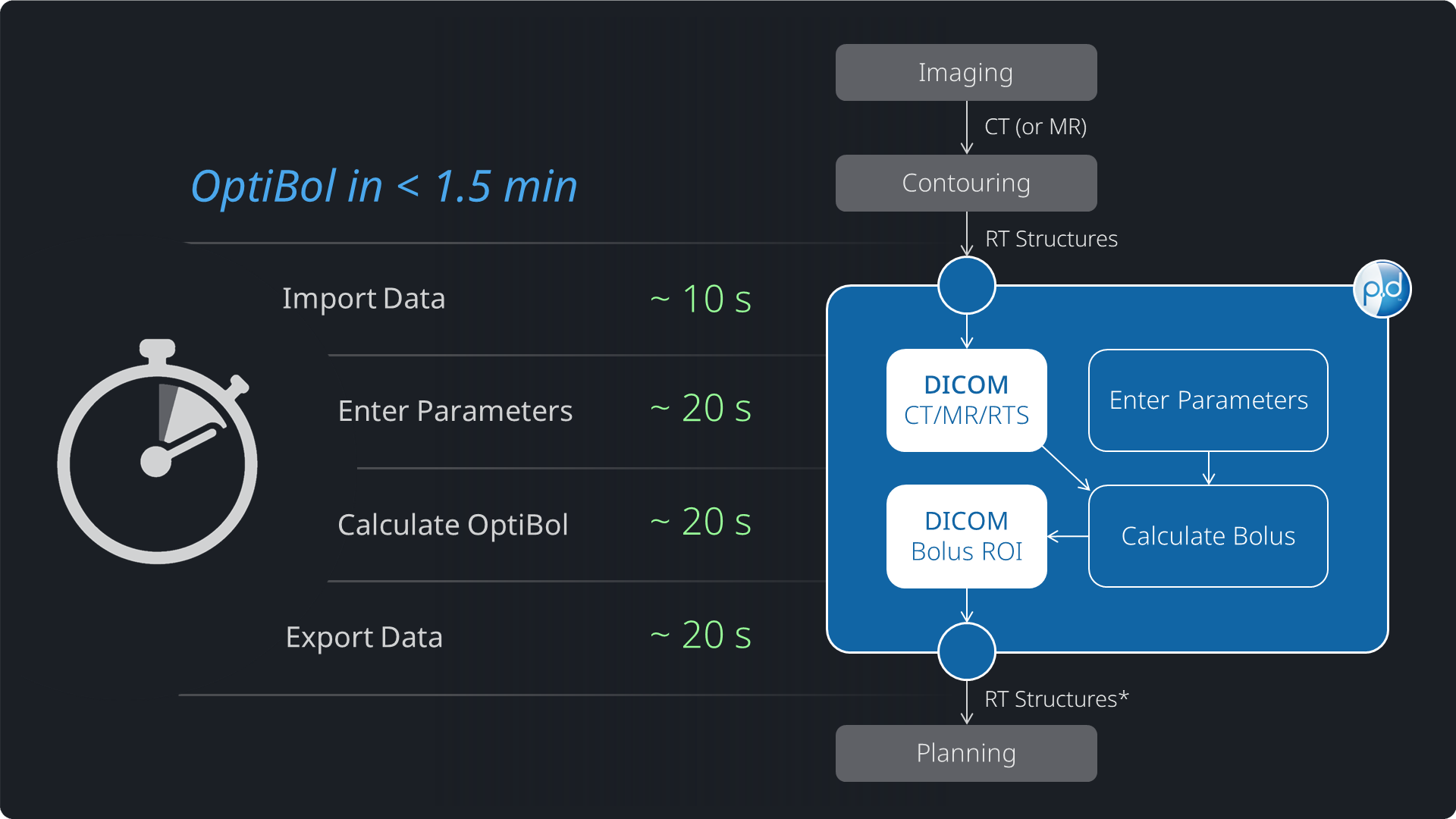
The entire bolus design process in the p.d software typically takes less than 2 minutes (see the real-time video demonstration in adjacent media gallery). The different steps are generalized as follows:
- ≤ 30 seconds to select and import DICOM data (e.g., CT and RT structure set with target and external contours)
- ≤ 30 seconds to enter the user-defined bolus design parameters
- ≤ 30 seconds to calculate the automated, variable-thickness bolus design
- ≤ 30 seconds to export a new DICOM RT Structure Set that has the bolus design as a new ROI
Paying Dividends in Plan Optimization
The variable-thickness OptiBol design sets up the treatment planner to be able to achieve target coverage more easily: (a) clearly compared to if no bolus is used, but also (b) compared to a conventional uniform thickness bolus which is likely under-bolused in some regions and potentially over-bolused in others. This should streamline the treatment planning process.
In addition, OptiBol designs have user-defined outer margins (as low as no margin/0 margin to as high as 30 mm) that will taper down smoothly from the thicker portions, and also to the edge of the bolus. OptiBol’s smooth tapering mitigates the non-ideal dosimetric perturbances possible when beams encounter abrupt edges of a conventional bolus.
The Value of Time Saved
Any time saved in designing the bolus and/or achieving the desired target coverage pays off in other areas. Maybe it provides more time to optimize plan quality or allows your team to increase throughput.
OptiBol was designed to help streamline your treatment planning so you can spend the extra time where it matters most!
* DICOM data import time is a function of where the imported files are compared to your p.d installation. If the files are local, you can expect ~10-30 second data import times, even for large datasets. This may take longer if files are stored on a wide-area network or you are working remotely.
Bolus Quality
Target-Based, Variable-Thickness
OptiBol design is inherently target-based, replacing the status quo of a simple uniform expansion from the skin. Because it’s target-based, the bolused region and 3D thickness profile will be what’s necessary and sufficient, without the worries of over-sized (or under-sized) boluses.
Also, the OptiBol shapes will model the desired buildup from all potential beam angles, considering the full range of potential gantry and couch angles. In this regard, an OptiBol design gives you planning flexibility with respect to how you arrange your beams.
Surface Quality
The OptiBol methodology inherently creates very smooth outer surfaces, but it also improves the smoothness of the inner, patient-side surfaces.
The processing of the inner surfaces removes small irregularities and roughness that are sometimes seen in external contours, often an artifact of CT (or MR) pixel-threshold algorithms in the TPS. The “milli-smoothing” process (on the order of a CT or MR pixel size) will improve the quality of the bolus in the case of very small-scale surface roughness – or “pixelation” – in the patient contours that would otherwise create a mottled appearance in the bolus surface.
Outer Margins with Tapered Edges
Steep or abrupt bolus edges, as seen in conventional uniform-thickness boluses, create dosimetric artifacts from external radiation beams. These artifacts can be problematic in planning, especially for targets at/near the patient skin surface.
To alleviate this potential dosimetric inconvenience, OptiBols have smooth, tapered edges.
In addition, the user can specify an outer margin value (mm) that will be added around the outside of the bolus shape to create a dosimetric and practical “gasket” of sorts. This outer surface will be of nominal thickness (3 mm), and the bolus will taper down from the main bolus surface, then down again toward the edges.
Ease of Setup
Conventional Alignment Methods
One might assume that custom-fit boluses are easy to set up on the patient because their inner surface matches the contoured patient. This is true for some boluses, but it’s not always that obvious.
To help position the bolus on the patient and/or align the bolus under the beams, treatment planning experts might manually edit the bolus surface to produce notches, grooves, or protrusions in strategic locations that can be located in both the treatment plan and in real life, on the manufactured bolus.
Like other conventional bolus techniques, this can be cumbersome and exhibit both user-to-user and patient-to-patient variation.
OptiBol Alignment Guides
While an OptiBol design can also be manually edited in the TPS, we try to save you time by providing an optional “alignment guide” feature.
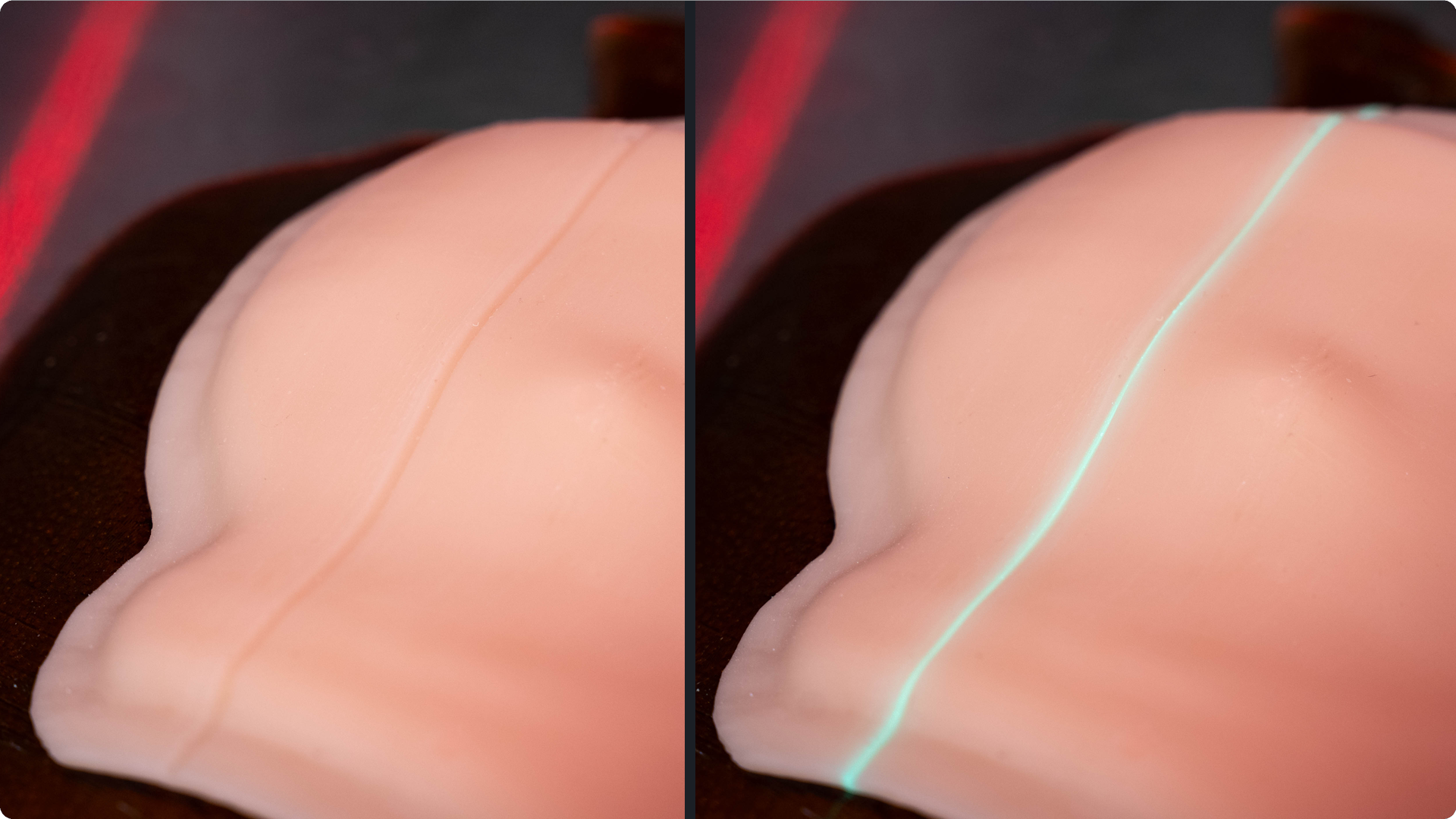
Alignment guides are small, precise, and dosimetrically insignificant grooves that can be set at user-defined sagittal and coronal plane locations. The sagittal plane will produce an alignment guide that is a straight line when viewed from above, running in the superior-inferior direction. The coronal plane will set alignment guides that are straight when viewed at normal incidence from the patient’s left and/or right.
The alignment guides can be used simply as rotational aids to assist in bolus positioning on the patient, or in more advanced ways with laser-alignment or surface-guidance systems. The grooves work very well with lasers, as a linear laser produces a glow effect when it falls perfectly inside the groove.
Patient Privacy
A Human’s Eye View
Some radiotherapy targets include (or are near) an anatomic region that a patient might feel is private or sensitive, e.g., the anterior pelvic region of both female and male patients.
In these regions, if a conventional uniform-thickness bolus is used, the bolus will simply expand the patient shape by a specified thickness. In the case of private anatomical regions, these boluses will reproduce the external anatomy on both the patient-side (inner) surface and also the visible outer surface.
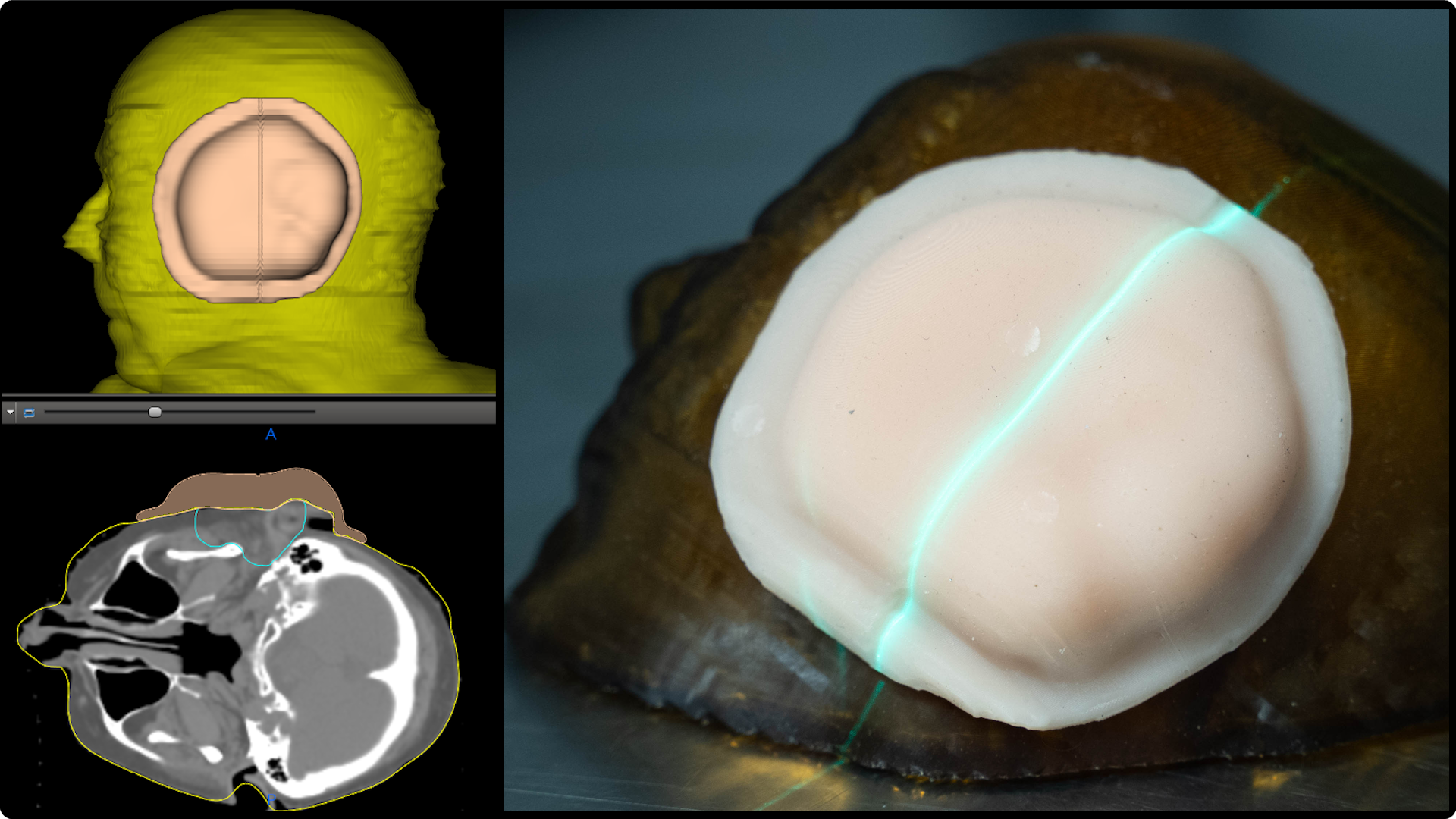
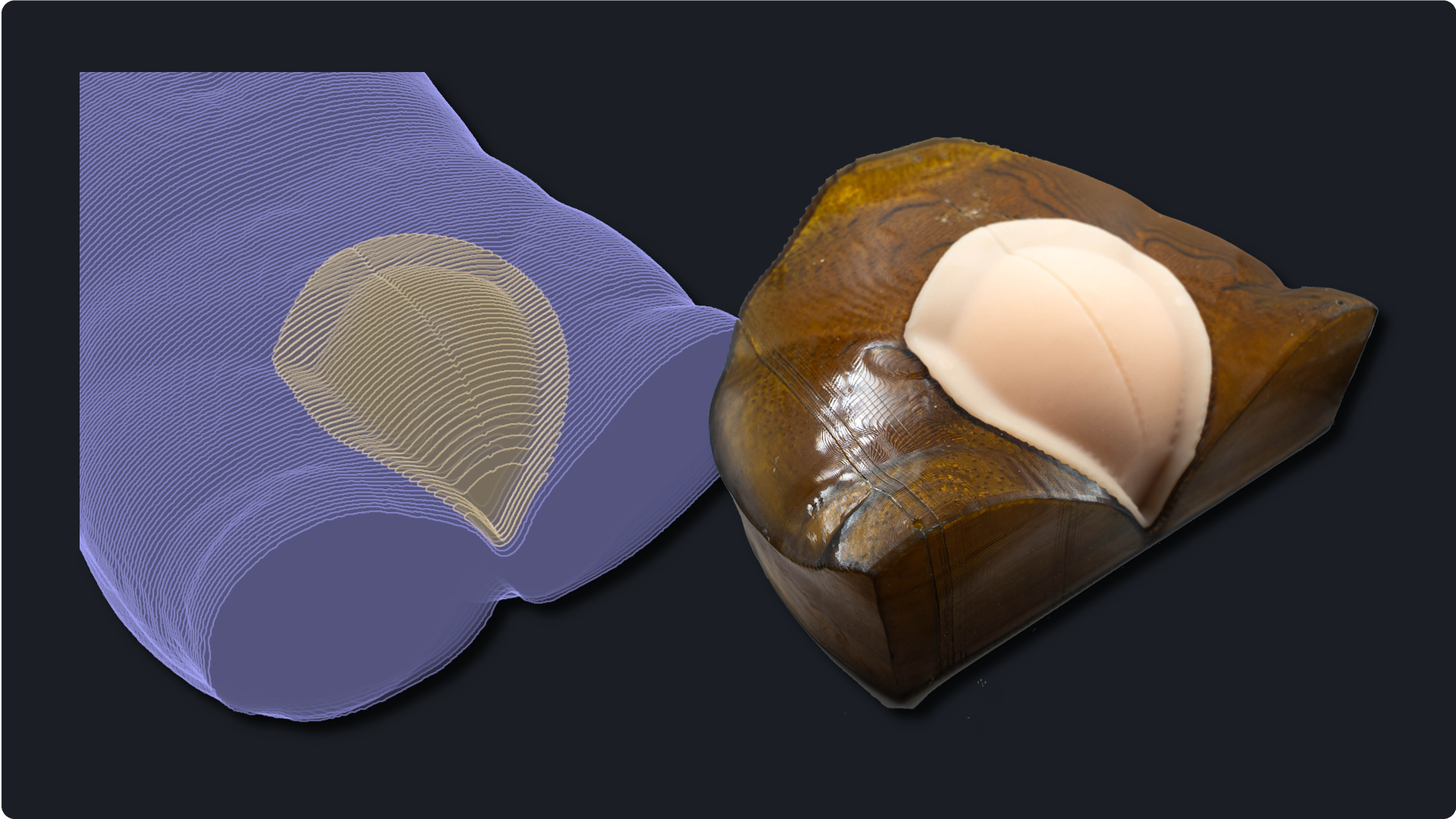
We recognized that with OptiBol, we could help to “anonymize” the visible (outer) surface of the bolus while still providing adequate buildup and keeping a custom-fit on the inner surface.
While it may seem a small point from a technical perspective, it might be a big point from a human perspective. And optimal treatment plans are not optimal unless great care given is to the patient experience.
Cost
One might assume that upgrading to OptiBol – an automated bolus design that saves time and produces higher-quality boluses – would cost more than just staying with the status quo and ordering custom-made, conventional uniform-thickness boluses. Well, we have good news …
Moving to OptiBol will not increase your costs, and it might actually reduce them!*
How OptiBol Might Reduce Your Costs
- Time Savings. As explained in the “Planning Efficiency” section, you are likely to save a lot of time in bolus design and treatment planning, and time is money. However, this is an indirect windfall, so what about direct cost savings? Read on …
- No added software license fees. There is no extra charge for the OptiBol design software. It is integrated into p.d, and access is granted to all p.d users.
- OptiBols do not cost more than their FlexiBol counterparts. The price for an OptiBol is determined the same way as FlexiBol, i.e., based on the size (max width and length) and surface area of the bolus.
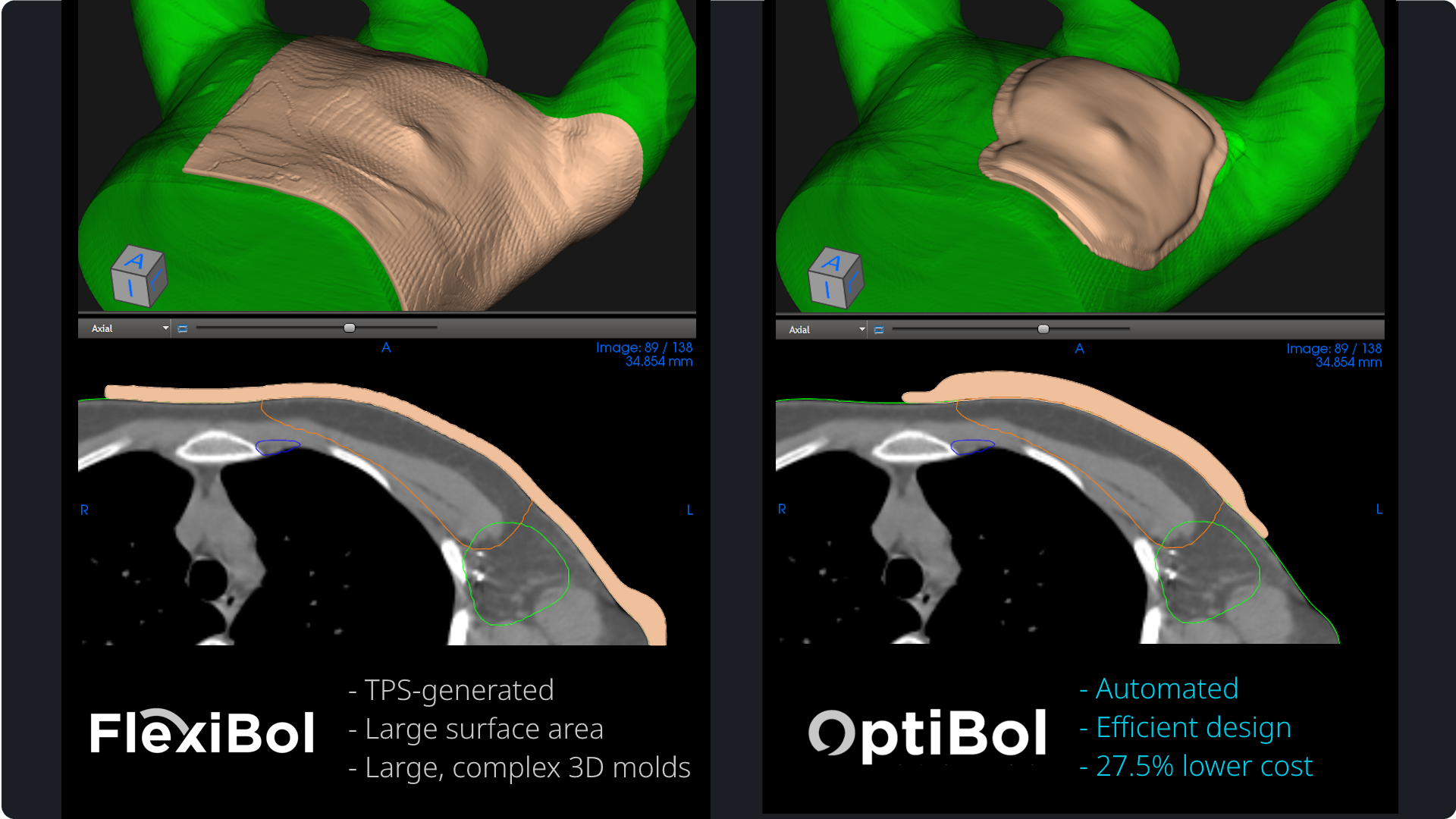
- In some cases, the OptiBol will be less expensive. Because of the automated design, some OptiBols will be “smaller” (in region covered, not thickness) compared to uniform-thickness boluses designed with conventional methods in the TPS. The OptiBol creation algorithm adds bolus material where it’s needed based on the target, but only where it’s needed. This avoids potentially over-estimating the size of the bolus needed when manually defining a region on the external surface.
See the example in the adjacent media gallery for a real-world chest wall bolus where an OptiBol is lower cost than a conventionally-designed uniform-thickness bolus.