
What is OptiBol?
Introduction
Introducing OptiBol™
OptiBols are variable-thickness boluses that are auto-designed using a patent-pending method that uses each patient’s unique target volume and external shape.
Like its predecessor the FlexiBol®, each OptiBol is a custom-made silicone bolus manufactured to ensure accuracy, flexibility, and comfort. And just like FlexiBols, OptiBols are shipped within two to three (2-3) business days of your order.
Workflow
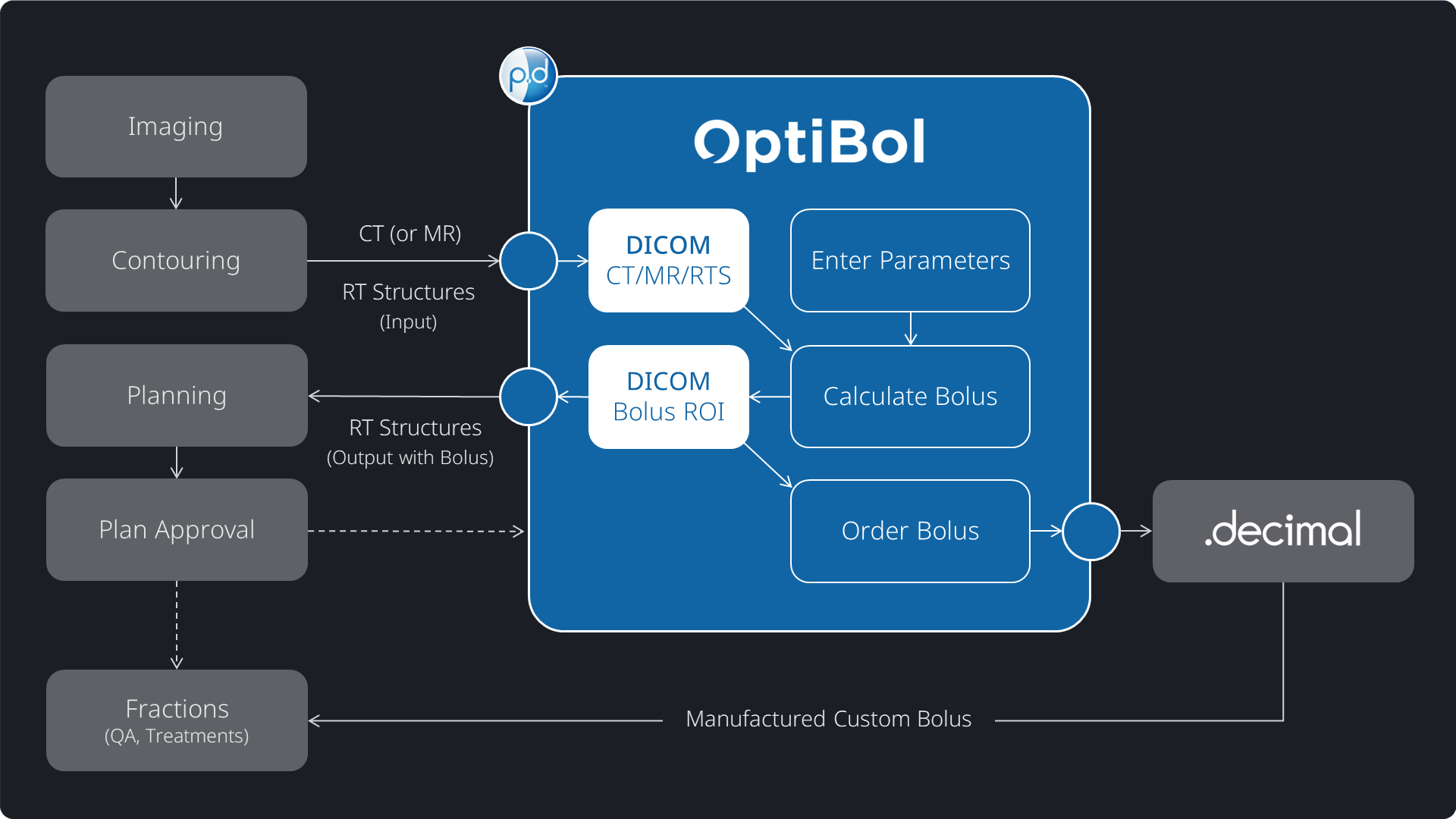
OptiBol designs are automated via features integrated into .decimal’s “p.d” software. OptiBol is compatible with any/all treatment planning systems (TPS) using industry-standard DICOM import and export.
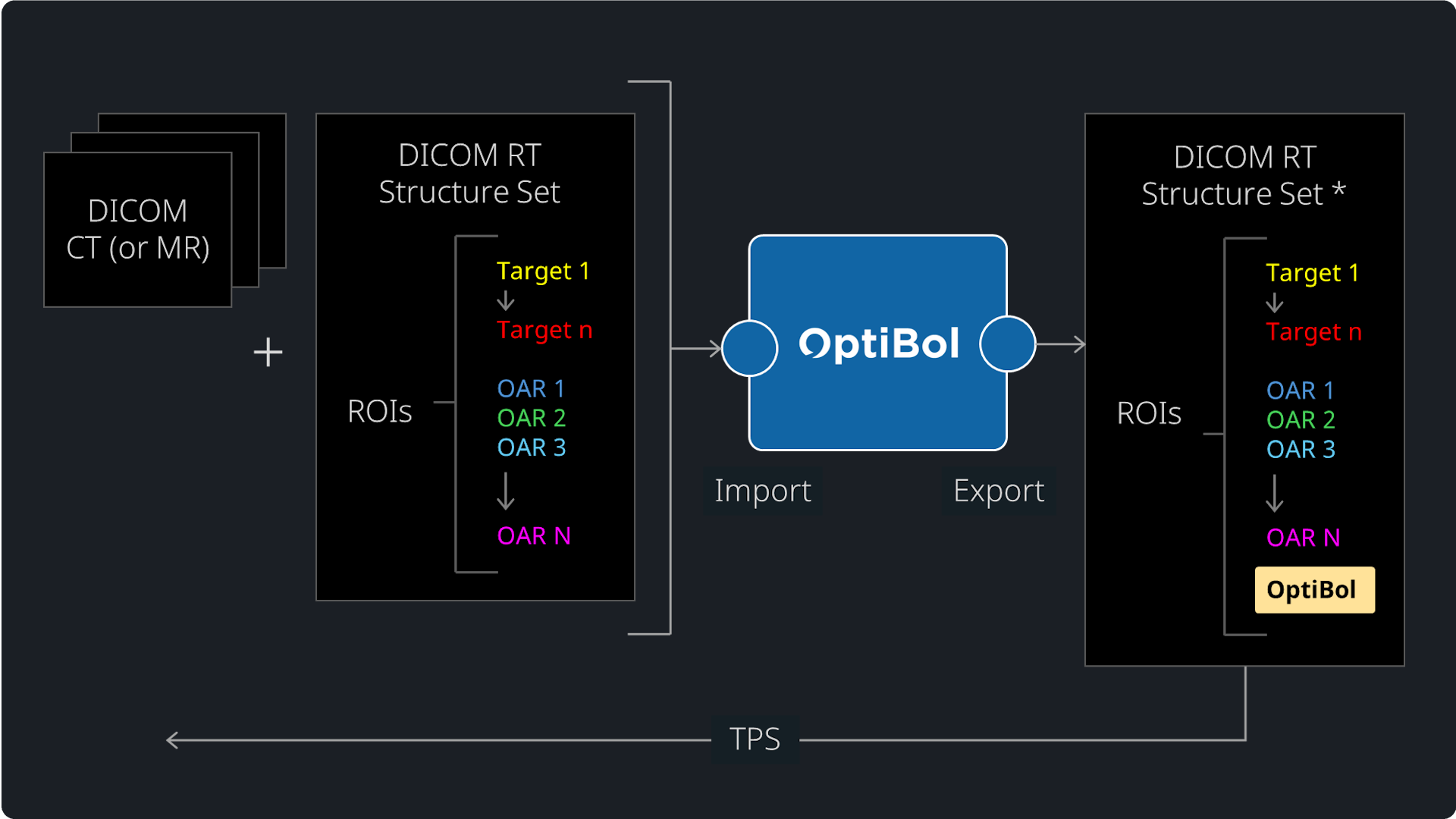
Import Images and RT Structures. Designing an OptiBol only requires that the patient external contour and target volume(s) have been contoured on the CT (or MR) planning images. (Note: The OAR contours are not required at the time of OptiBol design.) These planning images and contoured regions of interest (ROI) are imported by p.d as a DICOM image series and a DICOM RT Structure Set, respectively.
Enter OptiBol Design Parameters. In the p.d software, the user will define a few intuitive parameters such as their goal buildup (mm) with respect to the internal target(s), their preferred outer margin size (mm), and the alignment guide specifications if they want to build alignment guides into the bolus.
Calculate OptiBol. Once users have entered their bolus design parameters, the bolus calculation is automated and fast, typically taking less than 30 seconds for standard target sizes and complexities. The calculation is inherently three-dimensional (3D) and the goal buildup will accommodate any potential beam angles including non-coplanar directions.
Export OptiBol Design to TPS. The 3D bolus design is rendered as a series of axial contours and added as a new ROI (in some rare cases, multiple ROIs if a bolus design becomes bifurcated to cover different non-contiguous regions). The bolus ROI is exported by the p.d software as a new DICOM RT Structure Set.
Build Treatment Plan and Order Bolus. The RT Structure Set that now has the OptiBol ROI is imported into the TPS, where contouring may be completed (if not already) and a treatment plan can be created and optimized. When the treatment planning team is ready, the bolus can be ordered for manufacture by .decimal, using exactly the same process as FlexiBol.
See the adjacent image gallery for a summary of the OptiBol workflow.
Automated Design
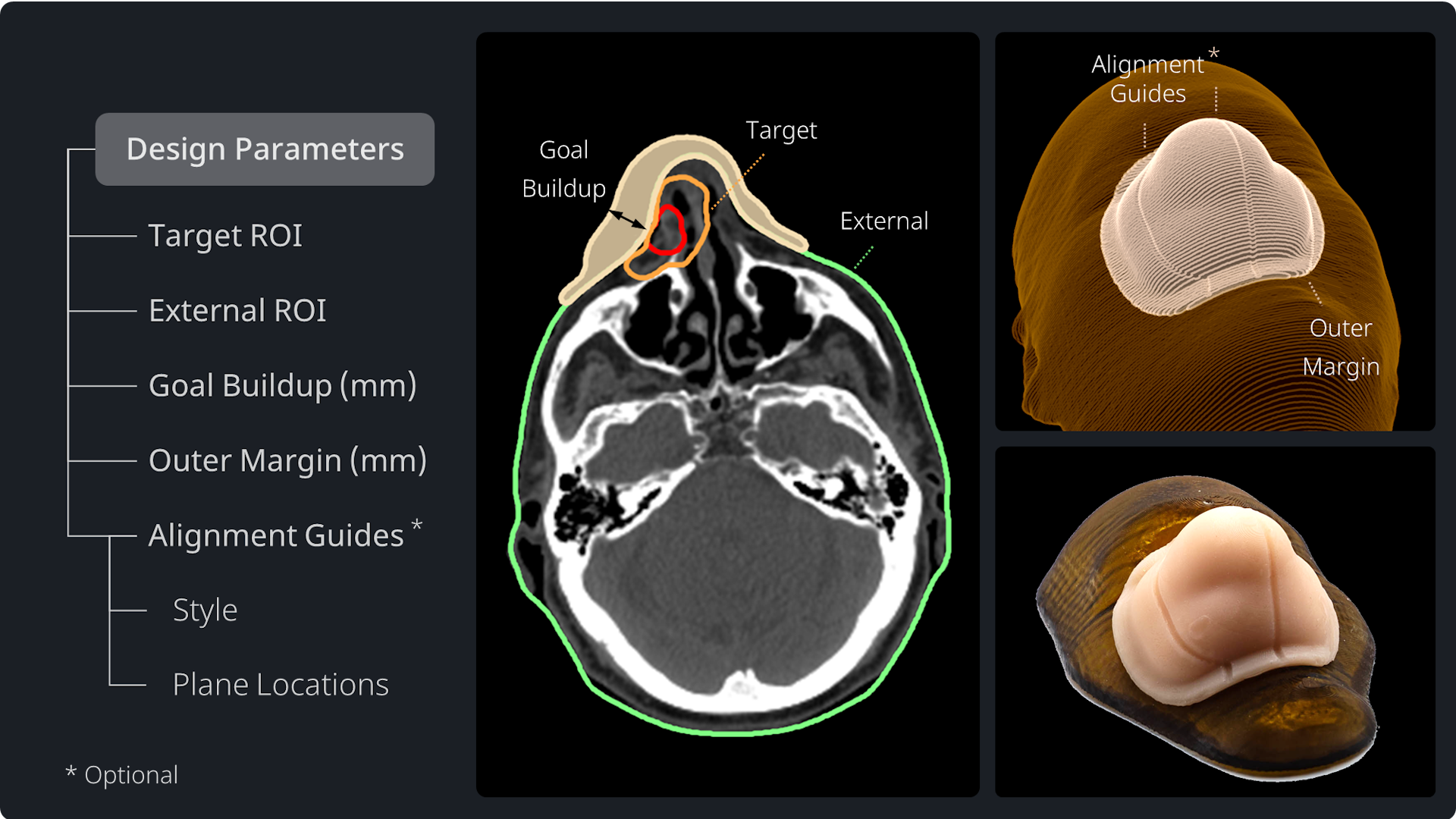
There is an intuitive set of parameters the user must enter before designing* each OptiBol.
Target ROI. The user selects their target ROI, which will typically be the PTV or union of multiple PTVs (if not completely overlapping).
External ROI. The user selects their external (i.e., body) contour. This will be used to model the custom fit of the bolus to the patient skin, i.e., the patient-side bolus surface.
Goal Buildup (mm). The goal buildup distance is the minimum depth of material (bolus or patient) the user wants to occur for all target voxels, from any potential beam angle (including not only gantry rotation, but couch rotation, i.e., non-coplanar). The algorithm will ensure that 95%+ of all shallow target voxels will have a minimum depth of 95% of the goal buildup depth once the OptiBol is placed on the skin.
Outer Margin (mm). The outer margin is a user-definable margin added around the outside of the bolus, which can be set in the range of 0 mm (no margin) up to 30 mm. The outer margin will manifest as a region of nominal thickness (3 mm) and with smooth, tapered edges that are more favorable for TPS optimizers and dose calculators.
Alignment Guides. Alignment guides are an optional feature to help you align your bolus during patient setup, per fraction. Alignment guides are added as small, visible guides along the outer bolus surface intersecting user-defined orthogonal planes (sagittal and coronal planes). Their shape is modeled in the output bolus shape and therefore captured in the dose calculation, but they are small enough to be dosimetrically insignificant.
Note: (*) The OptiBol design method is patent-pending.
Integration with TPS
OptiBol is vendor-neutral and can be used with any TPS via DICOM interface.
Imported Data
OptiBol requires the planning CT (or MR) series, plus an RT Structure Set.
The imported structure set only requires the target volume(s) and patient external contours. The organs-at-risk (OARs) are not required to design the OptiBol, and can be defined either before or after the OptiBol design is added to the structure set.
Note: The input image series and RT structure set can alternatively be imported from any 3rd party contouring system if that is a preferred workflow.
Exported Data
The p.d software will produce a new RT Structure Set with the bolus modeled as additional ROI(s). The user will import this into their TPS so that the bolus will be part of their “virtual patient” for treatment optimization and dose calculation.
The relative electron density (or appropriate CT number) for your selected bolus material will need to be defined for the bolus ROI(s) in the TPS. This allows the optimizer and dose calculation engine to accurately model the bolus as part of the irradiated volume.
Order / Manufacture
Ordering, Manufacturing, and Shipping
To order an OptiBol, you just open the p.d session and run the “Order Wizard” which allows you to review/edit your bolus label, review shipping details, specify a shipping priority (e.g., “Standard” or “Rush”), then process your order.
Once your order is submitted, you can monitor the progress of fabrication and shipping using your private account on the .decimal Direct customer portal.
OptiBols are manufactured and shipped within three (3) business days of your order.
Did You Know?
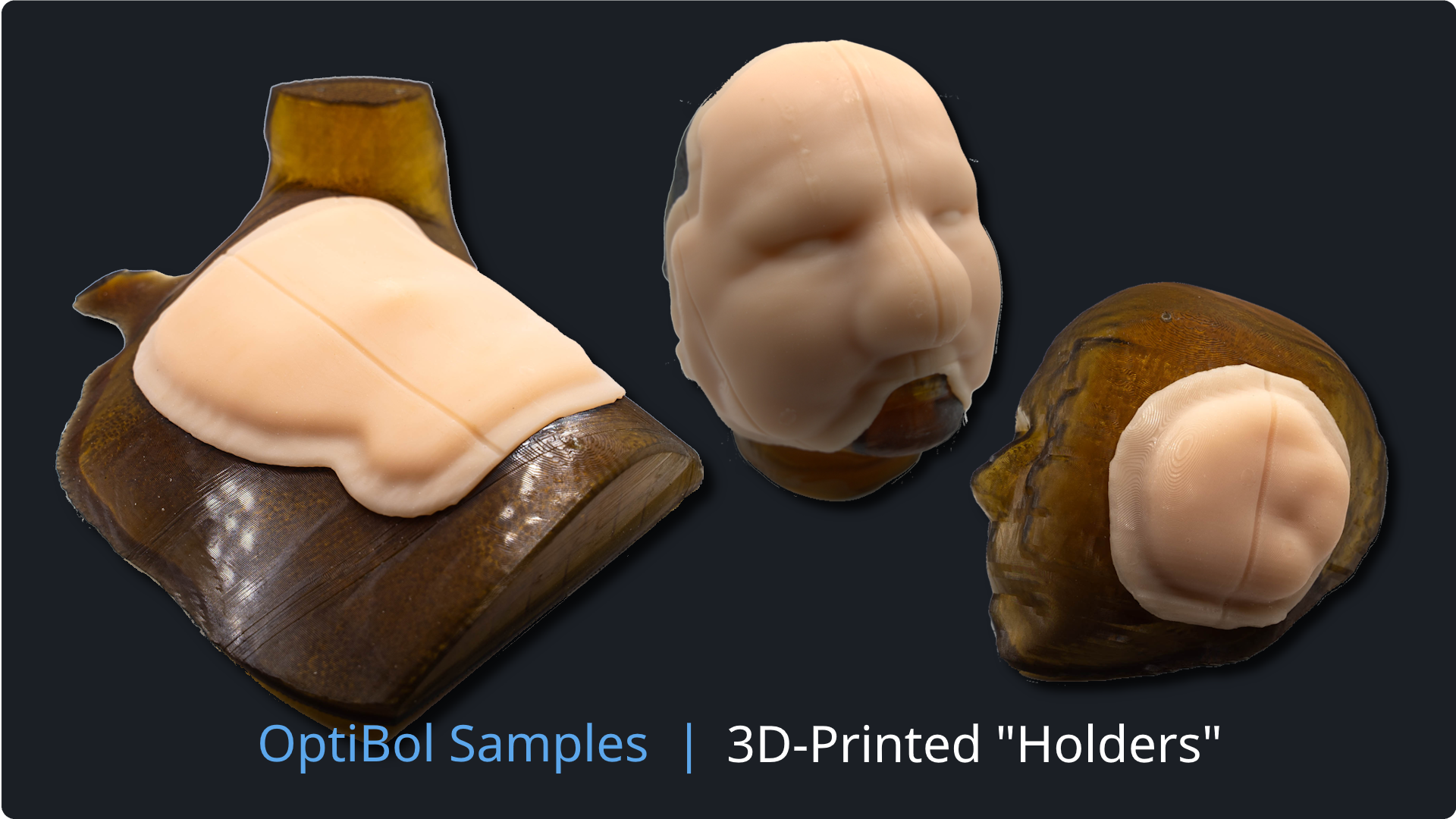
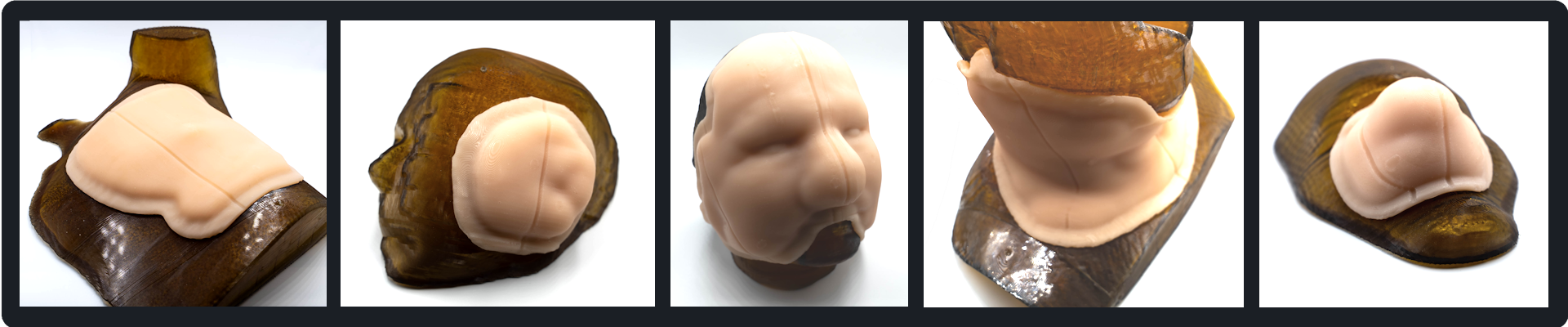
Did you know that you can also order 3D-printed FlexiBol and OptiBol “holders” for each bolus? These rigid-body holders will mimic the patient shape under the bolus. They can be useful in various applications, including imaging/QA of the bolus (with no patient present), storage, etc.
See the adjacent image gallery to see example OptiBol boluses with holders.
Note: If you would like to use an in-house 3D printer for OptiBol output design, you can request a special p.d license that opens up a feature that exports the bolus design in a file format compatible with 3D printers. This would produce a rigid-body bolus, not a flexible silicone one, and you would have to model the material differently in your TPS.